

Product Trivia
With Voice CLI, companies can control how their calls appear — whether using a local number, national line, or branded ID — all from one platform.
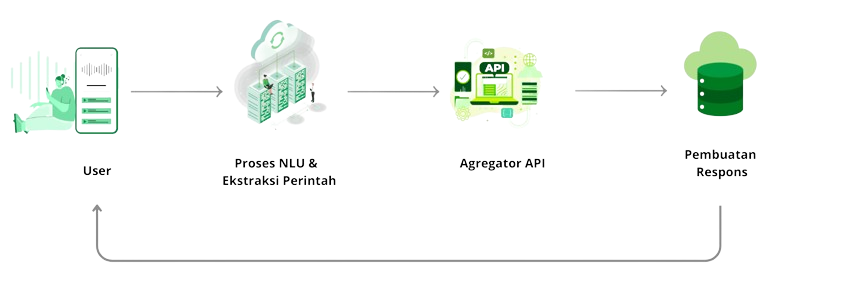
How to Voice CLI Work
Use Cases
Voice CLI (Command Line Interface) enables businesses to automate outbound or inbound voice interactions through programmable voice calls. It allows systems to trigger calls, play prompts, collect user inputs via keypad (DTMF), and execute workflow logic without manual intervention. This streamlines processes such as notifications, verifications, surveys, and reminders, delivering efficient, scalable, and cost-effective voice communication.
Banking and Finance
Banking and Finance
Banking and Finance
Frequently Ask Question (FAQ)
What is Voice CLI?
Voice CLI is a programmatic interface that allows applications to initiate, manage, and route voice calls using API commands. It enables automated IVR, call notifications, voice bots, call forwarding, and real-time call control without requiring telephony hardware.
How does Voice CLI work?
Voice CLI communicates with a telephony platform using REST APIs, Webhooks, or SIP.
Typical flow:
Application sends an API request (e.g., initiate call)
Voice platform triggers outbound call to destination
Platform sends webhook events back (ringing, answered, completed)
Application responds with call instructions (IVR prompts, TTS, DTMF actions)
What protocols does Voice CLI use?
Depending on the provider and setup:
HTTPS REST API for call actions (initiate, hang up, transfer)
SIP for direct telephony integration
WebSockets for real-time event control
Webhooks for call status callbacks (initiated, ringing, completed, failed)
What features are supported by Voice CLI?
Typical capabilities:
Outbound call initiation
Interactive Voice Response (IVR)
Text-to-Speech (TTS) & Speech-to-Text (STT)
DTMF digit collection
Call forwarding & bridging
Call recording
Real-time call control (mute, hold, transfer)
Webhook-based event tracking
Can Voice CLI support large-scale calling operations?
Yes. The system uses:
Distributed call routing
Load-balanced SIP gateways
Auto-scaling outbound call engines
Queue systems for bulk call campaigns
This allows handling thousands of concurrent automated calls.
How does authentication and security work in Voice CLI?
Security includes:
API keys or OAuth tokens for authentication
TLS/HTTPS encryption for all API requests
IP whitelisting for webhook endpoints
Optional SRTP/SIP-TLS for secure voice media streams
What kinds of use cases are enabled by Voice CLI?
Common implementations include:
Automated outbound calling (voice broadcast)
Two-factor authentication via voice OTP
IVR-based customer service
Appointment reminders
Call center automation
Payment notifications through voice prompts
Smart voice bots (AI-powered)
How are call events and statuses monitored?
Voice CLI generates real-time webhook events such as:
call.initiatedcall.ringingcall.answeredcall.completedcall.failedDTMF input events
Applications use these events to update dashboards, trigger workflows, or analyze performance.
Does Voice CLI support media features like TTS and STT?
Yes. Most platforms support:
Text-to-Speech (TTS) in multiple languages
Speech Recognition (STT) for voice commands
Pre-recorded audio playback
Call recording for compliance or training
What is required to integrate Voice CLI into my system?
You will need:
API credentials (API key / token)
A publicly accessible webhook URL
Ability to parse JSON callback payloads
SIP trunk or DID number (optional, depending on setup)
Backend logic to handle call actions (IVR tree, responses, prompts)
Optional media assets (audio files, prompt templates)