
WhatsApp Marketing

Product Trivia

Businesses using WhatsApp Marketing achieve up to 98% open rates, compared to just 20–30% for traditional email campaigns.

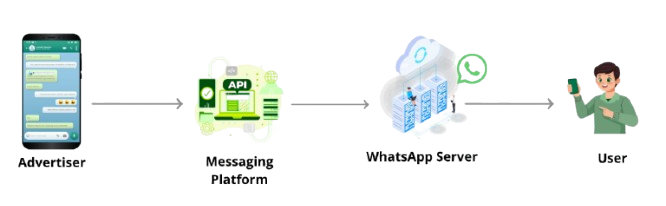
How to WhatsApp Marketing Work

Use Cases

WhatsApp Marketing enables businesses to reach customers through personalized, real-time messages on WhatsApp, including promotions, updates, and interactive templates. It helps boost engagement by delivering relevant content directly to a channel users trust and use daily, supporting stronger customer relationships and higher conversion rates.

Banking and Finance

Sending OTPs, transaction alerts, and fraud notifications.

Banking and Finance

Sending OTPs, transaction alerts, and fraud notifications.
Banking and Finance

Sending OTPs, transaction alerts, and fraud notifications.

Frequently Ask Question (FAQ)

What is WhatsApp Marketing?

WhatsApp Marketing leverages the WhatsApp Business API/Cloud API to deliver promotional messages, product updates, broadcast campaigns, and personalized marketing content to opted-in customers using approved message templates.

The WhatsApp Business App limits broadcasts to contacts who have your number saved and is not scalable.
WhatsApp Marketing via API offers:

  • Higher throughput

  • Template automation

  • CRM integration

  • Advanced analytics

  • Multi-agent automation

  • Unlimited audience (as long as opt-in is verified)

Supported message types include:

  • Template messages (text, media, buttons, list menus)

  • Images, videos, PDFs

  • Product messages (Single Product, Multi-Product)

  • Interactive buttons (Call-to-action, Quick Reply)

  • Catalog and collection messages

WhatsApp Marketing uses:

  • Meta WhatsApp Business Cloud API (HTTPS)

  • On-Premise WhatsApp Business API (REST)

  • Webhook callbacks for message status, delivery, and user replies
    Media files are uploaded via /media endpoints before sending.

Yes. Promotional messages must use approved templates under categories such as:

  • Marketing

  • Utility

  • Authentication
    Templates undergo Meta’s automated review for compliance and clarity.

WhatsApp requires explicit opt-in collected via:

  • Website forms

  • SMS/email consent

  • QR code

  • WhatsApp thread initiation

  • In-store or call-center confirmation
    The opt-in process must be verifiable and logged.

Throughput depends on the business tier:

  • Tier 1: Up to 1,000 users/day

  • Tier 2: 10,000 users/day

  • Tier 3: 100,000 users/day

  • Tier 4+: Unlimited scaling based on quality rating & engagement
    Tiers upgrade automatically based on 24-hour engagement volume.

WhatsApp provides detailed analytics via webhooks, including:

  • Message sent / delivered / read statuses

  • Button click tracking

  • User replies

  • Quality rating & template approval status

  • Block/unsubscribe warnings
    Data can be pushed to dashboards or CRM systems.

Yes. WhatsApp enforces:

  • Strict no-spam policies

  • Mandatory opt-in

  • Template approval

  • Restrictions on sensitive content (financial, medical, political)
    Violations can lead to number suspension or template rejection.

You need:

  • A registered WhatsApp Business Account (WABA)

  • A verified Facebook Business Manager

  • A phone number connected to the WABA

  • API access token (Cloud API / On-prem)

  • A webhook URL for receiving events

  • Approved message templates

  • CRM or backend service to orchestrate campaigns